MFC Broher 7820N driver installation on local machine(Non-LAN). download full driver package and install it on my local machine-Non LAN beside my printer.
Saturday, January 18, 2020

Tuesday, January 7, 2020
MFC quick demo
- MFC programming tutorial
- Module 1: Microsoft Windows, Visual C++ and Microsoft Foundation Class (MFC)
- Module 1a: Microsoft Windows, Visual C++ and Microsoft Foundation Class (MFC)
- Module 2: Getting Started with Visual C++ 6.0 AppWizard 1
- Module 2: Getting Started with Visual C++ 6.0 AppWizard 2
- Module 3: Basic Event Handling, Mapping Modes, and a Scrolling View 1 Module 3a: Basic Event Handling, Mapping Modes, and a Scrolling View 2
- Module 3b: Basic Event Handling, Mapping Modes, and a Scrolling View 3
- Module 4: The Graphics Device Interface (GDI), Colors, and Fonts 1
- Module 4: The Graphics Device Interface (GDI), Colors, and Fonts 2
- Module 4: The Graphics Device Interface (GDI), Colors, and Fonts 3
- Module 9: A Reusable Frame Window Base Class 1
- Module 9a: A Reusable Frame Window Base Class 2
- MODULE 10 THE C/C++ PREPROCESSOR DIRECTIVES 1
- MODULE 10 THE C/C++ PREPROCESSOR DIRECTIVES 2: #define etc.
- MFC Tutorial
- MFC - Dialog Boxes: Beginning point
- MFC - Messages & Events:End point
- MFC - GDI
- MFC - File System
- MFC - Standard I/O
- MFC - Document View
- MFC - Strings
first 4 modules are good enough. it has drawing circle logic.
quick tutorials
good info on include files and theory
another quick tutorial
above two links are in one tutorial. it has clear descriptions on how to create MFC application by creating a Win32 project.
Monday, January 6, 2020
good tools and utility
good tools and utility
- Joseph-M-Newcomer Article
- A-better-Zoomin-utility
- QHTM - Small Win32 HTML control
- zoom+ 'the ultimate screen magnifier'
- Articles and projects
- Lock-Windows-Desktop
- /Creating-Your-First-Windows-Application
- Windows Message Handling - Part 1
- Win32 Window Minimal
- How to Use control in form2 to form1 in c#
Saturday, January 4, 2020
good C++ video series
compiled list from Youtube of good C++ video series:
- Class and Object
- Constructor Destructor in C++
- C++ Tutorial for Beginners - Full Course: by minutes
- C++ Tutorial from Basic to Advance: separated by minutes in one class
- Using Libraries in C++ (Static Linking)
- Using Dynamic Libraries in C++
- How to Setup C++ on Windows
- Setup VS Code For C/C++ Development on Windows
- Welcome to C++
- Buckys C++ Programming Tutorials - 30 - Function Overloading
- Buckys C++ Programming Tutorials - 1 - Installing CodeBlocks
- Buckys C++ Programming Tutorials - 58 - function Templates
- C++ Programming Tutorials Playlist:73 series
- C++ Void Functions by profgustin
- C++ - Value-Returning Functions by profgustin
- C++ Part 51 - Void Functions Introduction by ICT Tutorial Channel
- C++ Part 52 - Reference Parameters
- C++ Part 81 - Class Constructors
- C++ Part 82 - Class Accessors
- C++ Part 01 - What You Need to Program: complete playlist from ICT Tutorial Channel
- C++ Programming All-in-One Tutorial Series (10 HOURS!)
- C++ Tutorials: complete play list from Caleb Curry
- C++ Programming | In One Video by Mike Dane:: by minutes
- C Programming Tutorial - 48: Functions (Part-4) Call By Value Method
class vs object related quick shots
class vs object related quick shots:by Extern CodeExtern Code
good C++ video series from Cherno
above is good series of tutorials. worth watching,
good video from NewBostons
above is good series of tutorials. worth watching,
another series
another series
one long lesson in 10 hours
a complete list
bad training: not so good training
Wednesday, January 1, 2020
Resolving issues( .ipch , .db , .suo files) in uploading VS projects (VC++) to SVN repository.
to resolve issues in uploading VS projects (VC++) to SVN respository. there are some .ipch , .db , .suo files are very big and don't need to upload to SVN repository.
- How to avoid precompiled headers
- Select your project, use the "Project -> Properties" menu
- go to the "Configuration Properties -> C/C++ -> Precompiled Headers" section,
- then change the "Precompiled Header" setting to "Not Using Precompiled Headers" option.
- Visual Studio: Disable Precompiled Headers
- Open your project, then select “Project” > “appname Properties…“.
- Expand “Configuration Properties” > “C/C++” > “Precompiled Headers“.
- Set “Precompiled Header” to “Not Using Precompiled Headers“.
- What are these .pch and .ncb files in visual studio?
- How to prevent or remove Visual Studio ipch/pch folders from the project
You can always disable the use of pre-compiled headers in the project settings.
Instructions for VS 2010 (should be similar for other versions of VS):
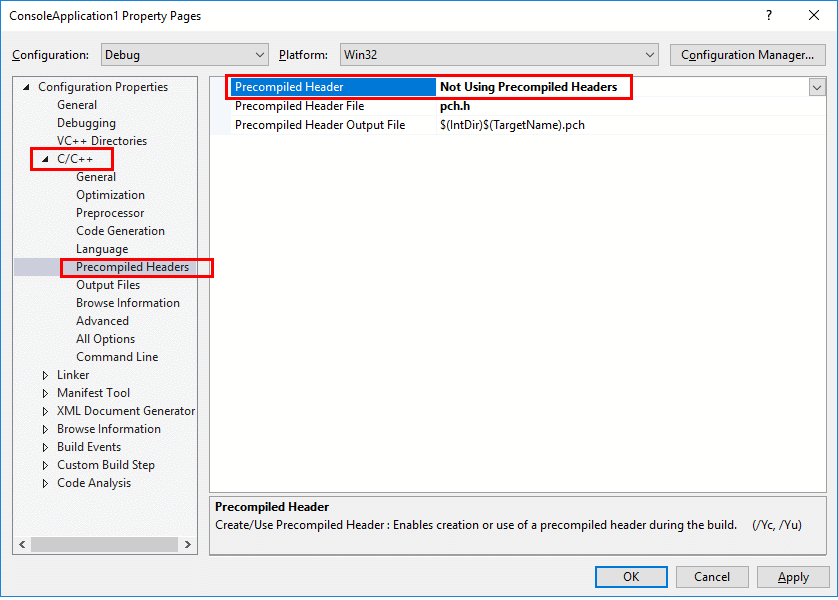
PCH is the precompiled headers file. It's a temporary that you can safely delete. You can disable its creation through Project Settings > C++ > Precompiled Headers > Don't use precompiled headers and removing the stdafx.cpp file from your project.
NCB is the database used by IntelliSense to allow you to browse the symbols defined in your project, including the inline hints and auto completion as you type. You can safely delete it. There is an option to disable IntelliSense too.
However, both features may be useful; therefore you may not want to disable them. If you worry about the size of the backups or sending the projects to some other programmer, then you can just clean the project by removing said files.
not useful.
Subscribe to:
Posts (Atom)